Three 5G routers, one test rig: Cradlepoint E320 vs InHand FWA02 vs Inseego FX4100
What happens when you put three very different 5G routers on the same T-Mobile SIMs in the same environment. A real-world side-by-side from my own bench.
I ended up with three 5G cellular routers on the bench at the same time: a Cradlepoint E320, an InHand FWA02 outdoor unit, and an Inseego Wavemaker FX4100. Different price points, different philosophies, all with T-Mobile business SIMs in them. Here’s what the side-by-side actually looked like.
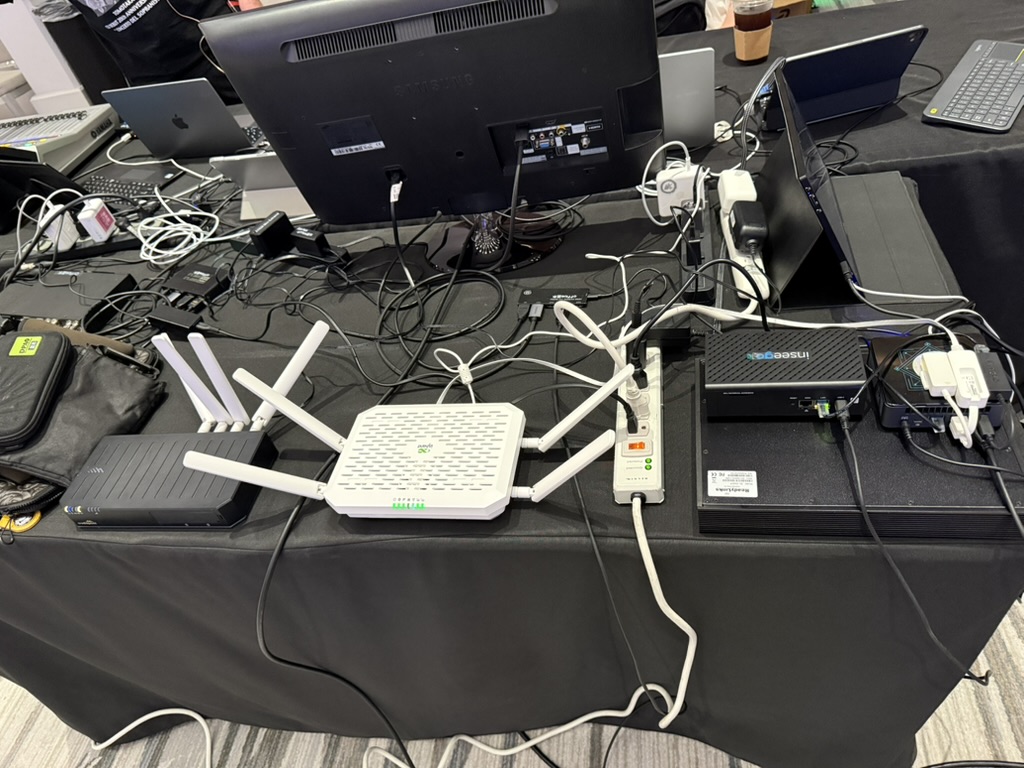
Left side of the frame is the Cradlepoint. Middle is a WiFi router in the rig. Right is the FWA02 in its enclosure next to the Inseego.
The three contenders
- Cradlepoint E320 — branch-class 5G router, $1,000+ hardware, NetCloud subscription required. Built for enterprise branch deployment. Read the full review →
- InHand FWA02 — outdoor 5G CPE, $699, cloud-managed via InHandGo. Designed for rooftop / wall-mount deployments with PoE. Read the full review →
- Inseego Wavemaker FX4100 — indoor 5G router with external antenna ports, $899, Snapdragon X75 modem with WiFi 7. The most-spec’d unit of the three. Read the full review →
Setup speed
InHand FWA02 wins. Scan the QR with the InHandGo app, assign to a site, adopt SIM, done. Under 5 minutes from power-on to passing traffic.
Cradlepoint NetCloud is a close second, especially if you’ve used it before — the first-boot wizard handles APN, SIM selection, and WiFi in a single flow.
Inseego’s admin UI is the most work. It’s functional, but it’s vendor-specific and takes longer to navigate if you’re new to it.
Management day-to-day
All three have cloud platforms. Ranked by how much I actually enjoyed using them:
- InHandGo (FWA02) — clean, phone-first, alerts that actually fire, all the RF telemetry in one view.
- NetCloud (E320) — deep and capable, but you feel the enterprise-ness. More clicks to do anything.
- Inseego Connect (FX4100) — functional, but least polished of the three.
If you’re managing multiple sites and don’t want to drive to every one, this ranking matters a lot.
Raw throughput
All three on the same T-Mobile SIM, roughly the same RF conditions:
- FX4100 pulled hardest. The Snapdragon X75 modem is doing real work — consistently 50-100 Mbps more than the other two when signal was strong.
- E320 was steady middle. Solid, predictable, never a surprise in either direction.
- FWA02 slightly behind on raw downlink but the advantage of being outdoor-mounted means in practice its signal quality was better than the indoor units.
Reliability
- E320: zero blinks. Ran the test for days, never touched it, never an issue. This is what you pay the Cradlepoint premium for.
- FWA02: also solid. Sat outside in Waikiki heat and did not care.
- FX4100: occasional modem lockup. Recovered with a reboot. Firmware feels still maturing. I wouldn’t drop one into an unattended site yet.
What I’d deploy where
- Unattended, production-critical: E320. The reliability + enterprise management justify the cost when downtime is expensive.
- Rooftop / outdoor / multi-site with cloud management: FWA02. Genuine set-and-forget.
- Indoor, attended, maximum throughput: FX4100 — once you accept the occasional reboot. Pair it with a 4x4 MIMO external antenna for the best-case performance.
What I wouldn’t pick
Any generic carrier gateway (KVD21, G4AR, Verizon’s stock units) for a setup where signal is marginal and you need external antenna control. All three routers in this test expose or attach external antennas properly; none of the stock carrier gateways do.
Bottom line
Different jobs, different tools. If someone forced me to pick one for every use case, it’d be the FWA02 — lowest friction, best cloud UX, outdoor mounting eliminates the biggest indoor 5G problem. But the right answer is really “the tool that matches your constraints,” and that’s what the three full reviews get into.