How to install an external antenna on your 5G home internet
Upgrade from the stock gateway's internal antennas to a roof-mounted directional panel — step-by-step, with connector diagrams and signal-strength verification.
- Drill with masonry bit
- Cable crimper
- Compass or cell-tower finder app
- Stud finder
- Ladder
An external directional antenna is the single biggest upgrade you can make to a fixed wireless install — often converting 1-2 bar internal performance into 4-5 bar external performance. The tradeoff: it requires a modem with external antenna ports, since the stock T-Mobile and Verizon gateways don’t have them.
What you’ll need
- Modem with external ports: Netgear M6 Pro, Cradlepoint R2100, or similar
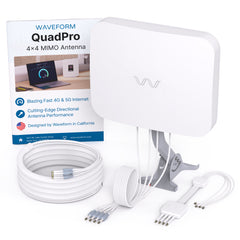
- Directional antenna: 4x4 MIMO recommended (Waveform is the community favorite)
- Low-loss coax: LMR-400 cuts signal loss dramatically over long runs
- Weatherproof mount and enclosure: keep connections dry
Step 1: Find the nearest tower
Use CellMapper or the “Network Cell Info Lite” app on Android to identify the exact tower you’re currently connected to. Note its bearing from your home. The antenna needs to point directly at this tower for maximum gain.
Step 2: Pick the mount location
Higher = better. Line-of-sight to the tower is ideal, but even partial elevation above tree/roof obstructions helps significantly. The shorter the cable run from antenna to modem, the less loss you’ll see — which is why some installs use an outdoor enclosure with the modem mounted right next to the antenna.
Step 3: Run the cables
LMR-400 has a 1.5-inch minimum bend radius — don’t kink it. Use weatherproofing tape (not electrical tape) on all outdoor connectors. Drill entry holes at a downward angle to prevent water intrusion, and use a drip loop on the cable.
Step 4: Verify signal strength
Log into your modem’s admin interface and check RSRP, RSRQ, and SINR values before and after:
- RSRP should be better than -100 dBm (closer to zero = stronger)
- RSRQ should be better than -12 dB
- SINR above 10 dB is excellent, below 0 dB is unusable
If the new antenna isn’t improving these numbers meaningfully, try re-aiming it in 5-degree increments — small aiming errors make a big difference at mid-band 5G frequencies.